HTTP API Reference#
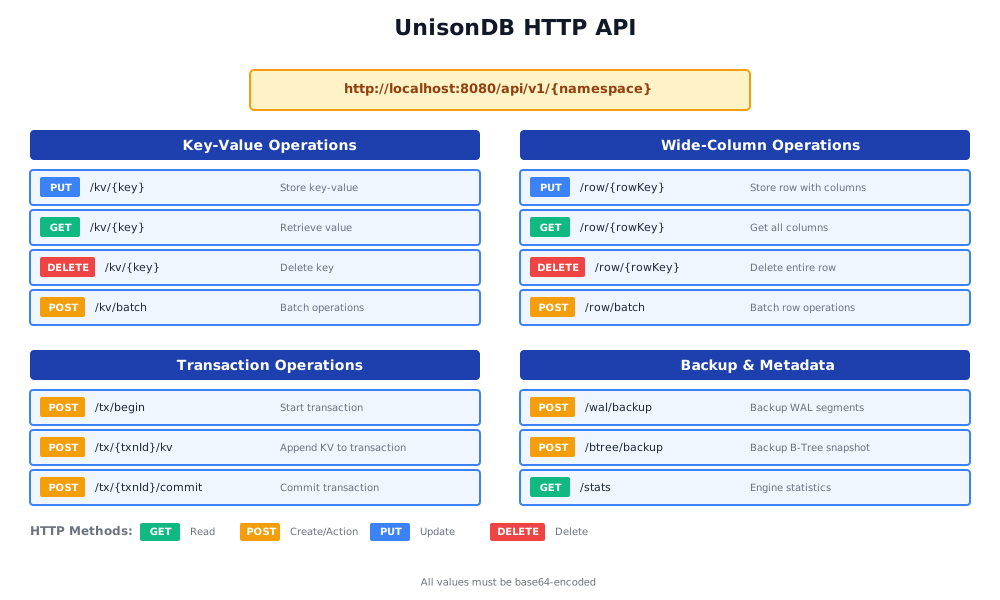
Complete reference for UnisonDB’s HTTP REST API.
Base URL#
http://localhost:4000/api/v1/{namespace}Data Encoding#
All binary values must be base64-encoded :
# Encode a value
echo -n "hello world" | base64
# Output: aGVsbG8gd29ybGQ=

# Use in request
curl -X PUT http://localhost:4000/api/v1/default/kv/greeting \
  -d '{"value":"aGVsbG8gd29ybGQ="}'
Request Size Limits Restrictions#
Maximum Request Size#
To keep UnisonDB’s HTTP layer efficient, safe, and predictable, each HTTP request is limited to a maximum size of 1 MB.
This limit applies to the entire request body, including:
- JSON payload
- Base64-encoded values
- Any metadata sent in the body
If your workload needs to store data larger than 1 MB, you should not push it as a single HTTP write. Instead, use UnisonDB’s transactional (Txn) write path , which is designed to handle larger logical operations safely and atomically.
Key-Value Operations#
Put KV#
Store a key-value pair.
Request:
PUT /api/v1/{namespace}/kv/{key}
Content-Type: application/json

{
  "value": "base64-encoded-value"
}Example:
curl -X PUT http://localhost:4000/api/v1/default/kv/user:123 \
  -H "Content-Type: application/json" \
  -d '{
    "value": "eyJuYW1lIjoiSm9obiIsImFnZSI6MzB9"
  }'
Response (200 OK):
{
  "success": true
}Errors:
400 Bad Request: Invalid base64 encoding404 Not Found: Namespace not found500 Internal Server Error: Engine error
Get KV#
Retrieve a value by key.
Request:
GET /api/v1/{namespace}/kv/{key}Example:
curl http://localhost:4000/api/v1/default/kv/user:123Response (200 OK):
{
  "value": "eyJuYW1lIjoiSm9obiIsImFnZSI6MzB9",
  "found": true
}
Response (404 Not Found):
{
  "value": "",
  "found": false
}
Delete KV#
Delete a key.
Request:
DELETE /api/v1/{namespace}/kv/{key}Example:
curl -X DELETE http://localhost:4000/api/v1/default/kv/user:123Response (200 OK):
{
  "success": true
}
Batch KV Operations#
Perform multiple operations in one request.
Batch Put#
Request:
POST /api/v1/{namespace}/kv/batch
Content-Type: application/json

{
  "operation": "put",
  "items": [
    {"key": "key1", "value": "dmFsdWUx"},
    {"key": "key2", "value": "dmFsdWUy"}
  ]
}Example:
curl -X POST http://localhost:4000/api/v1/default/kv/batch \
  -d '{
    "operation": "put",
    "items": [
      {"key": "user:1", "value": "dXNlcjE="},
      {"key": "user:2", "value": "dXNlcjI="}
    ]
  }'
Response (200 OK):
{
  "success": true,
  "processed": 2
}
Batch Delete#
Request:
POST /api/v1/{namespace}/kv/batch
Content-Type: application/json

{
  "operation": "delete",
  "keys": ["key1", "key2"]
}
Response (200 OK):
{
  "success": true,
  "processed": 2
}
Wide-Column Operations#
Put Row#
Store a row with multiple columns.
Request:
PUT /api/v1/{namespace}/row/{rowKey}
Content-Type: application/json

{
  "columns": {
    "column1": "base64-value1",
    "column2": "base64-value2"
  }
}Example:
curl -X PUT http://localhost:4000/api/v1/default/row/user:john \
  -d '{
    "columns": {
      "name": "Sm9obiBEb2U=",
      "email": "am9obkBleGFtcGxlLmNvbQ==",
      "age": "MzA="
    }
  }'
Response (200 OK):
{
  "success": true
}
Get Row#
Retrieve all columns for a row.
Request:
GET /api/v1/{namespace}/row/{rowKey}Example:
curl http://localhost:4000/api/v1/default/row/user:johnResponse (200 OK):
{
  "rowKey": "user:john",
  "columns": {
    "name": "Sm9obiBEb2U=",
    "email": "am9obkBleGFtcGxlLmNvbQ==",
    "age": "MzA="
  },
  "found": true
}
Get Row Columns#
Retrieve specific columns only.
Request:
GET /api/v1/{namespace}/row/{rowKey}?columns=col1,col2Example:
curl "http://localhost:4000/api/v1/default/row/user:john?columns=name,email"Response (200 OK):
{
  "rowKey": "user:john",
  "columns": {
    "name": "Sm9obiBEb2U=",
    "email": "am9obkBleGFtcGxlLmNvbQ=="
  },
  "found": true
}
Delete Row#
Delete an entire row.
Request:
DELETE /api/v1/{namespace}/row/{rowKey}Example:
curl -X DELETE http://localhost:4000/api/v1/default/row/user:johnResponse (200 OK):
{
  "success": true
}
Delete Row Columns#
Delete specific columns from a row.
Request:
DELETE /api/v1/{namespace}/row/{rowKey}/columns?columns=col1,col2Example:
curl -X DELETE "http://localhost:4000/api/v1/default/row/user:john/columns?columns=age,city"Response (200 OK):
{
  "success": true
}
Batch Row Operations#
Batch Put Rows#
Request:
POST /api/v1/{namespace}/row/batch
Content-Type: application/json

{
  "operation": "put",
  "rows": [
    {
      "rowKey": "user:1",
      "columns": {
        "name": "QWxpY2U=",
        "email": "YWxpY2VAZXhhbXBsZS5jb20="
      }
    }
  ]
}
Response (200 OK):
{
  "success": true,
  "processed": 1
}
Large Object (LOB) Operations#
Put LOB#
Upload a large binary object. Check Transaction API.
Get LOB#
Download a large binary object.
Request:
GET /api/v1/{namespace}/lob?key={key}Example:
curl "http://localhost:4000/api/v1/default/lob?key=file:doc.pdf" \
--output document.pdfResponse: Binary data stream
Transaction Operations#
Transactions allow atomic operations across multiple keys.
Transaction Lifecycle#
1. BEGIN    → Get transaction ID
2. APPEND   → Add operations (multiple times)
3. COMMIT   → Apply atomically
   OR
3. ABORT    → Cancel transaction
Transaction Type Restrictions#
Transactions are bound to the entryType specified during BEGIN.
Once opened, a transaction can only accept operations matching its type:
entryType | Allowed Operations | Endpoint |
|---|---|---|
kv | Key-Value only | POST /tx/{txnId}/kv |
row | Wide-Column only | POST /tx/{txnId}/row |
lob | Large Objects only | POST /tx/{txnId}/lob |
Begin Transaction#
Start a new transaction.
Request:
POST /api/v1/{namespace}/tx/begin
Content-Type: application/json

{
  "operation": "put",
  "entryType": "kv"
}Parameters:
operation:"put","update", or"delete"entryType:"kv","row", or"lob"
Example:
curl -X POST http://localhost:4000/api/v1/default/tx/begin \
  -d '{
    "operation": "put",
    "entryType": "kv"
  }'
Response (200 OK):
{
  "txnId": "2a3b4c5d6e7f8g9h0i1j2k3l4m5n6o7p",
  "success": true
}
Save the txnId - you’ll need it for subsequent requests!
Append KV to Transaction#
Add a key-value operation to the transaction.
Request:
POST /api/v1/{namespace}/tx/{txnId}/kv
Content-Type: application/json

{
  "key": "mykey",
  "value": "bXl2YWx1ZQ=="
}Example:
# Use the txnId from BEGIN response
curl -X POST http://localhost:4000/api/v1/default/tx/2a3b4c.../kv \
  -d '{
    "key": "account:alice",
    "value": "MTAwMA=="
  }'
Response (200 OK):
{
  "success": true
}
Call this endpoint multiple times to add multiple operations to the same transaction.
Append Row to Transaction#
Add a row operation to the transaction.
Request:
POST /api/v1/{namespace}/tx/{txnId}/row
Content-Type: application/json

{
  "rowKey": "user:1",
  "columns": {
    "name": "QWxpY2U=",
    "status": "YWN0aXZl"
  }
}Example:
curl -X POST http://localhost:4000/api/v1/default/tx/{txnId}/row \
  -d '{
    "rowKey": "user:charlie",
    "columns": {
      "name": "Q2hhcmxpZQ==",
      "email": "Y2hhcmxpZUBleGFtcGxlLmNvbQ=="
    }
  }'
Response (200 OK):
{
  "success": true
}
Append LOB to Transaction#
Add a large object to the transaction.
Request:
POST /api/v1/{namespace}/tx/{txnId}/lob?key={key}
Content-Type: application/octet-stream

<binary data>Example:
curl -X POST "http://localhost:4000/api/v1/default/tx/{txnId}/lob?key=file:backup.tar.gz" \
  --data-binary @backup.tar.gz
Response (200 OK):
{
  "success": true
}
Handling Large Objects (LOB > 1MB)#
For files or data larger than 1MB, use LOB transactions with chunking:
Example: Upload a 5MB File#
#!/bin/bash
FILE="large-file.bin"
KEY="files:backup-20250108.tar.gz"
CHUNK_SIZE=1048576  # 1MB chunks

# 1. Begin LOB transaction
RESPONSE=$(curl -s -X POST http://localhost:4000/api/v1/default/tx/begin \
  -d '{"operation":"put","entryType":"lob"}')
TXN_ID=$(echo $RESPONSE | jq -r '.txnId')

# 2. Split file into 1MB chunks and upload
split -b $CHUNK_SIZE "$FILE" /tmp/chunk_
for CHUNK in /tmp/chunk_*; do
  echo "Uploading $CHUNK..."
  curl -X POST "http://localhost:4000/api/v1/default/tx/$TXN_ID/lob?key=$KEY" \
    --data-binary @"$CHUNK"
done

# 3. Commit transaction
curl -X POST http://localhost:4000/api/v1/default/tx/$TXN_ID/commit

# 4. Cleanup
rm /tmp/chunk_*

echo "Large file uploaded successfully!"
Commit Transaction#
Apply all operations atomically.
Request:
POST /api/v1/{namespace}/tx/{txnId}/commitExample:
curl -X POST http://localhost:4000/api/v1/default/tx/2a3b4c.../commitResponse (200 OK):
{
  "success": true
}
After commit:
- All operations are applied atomically
- Transaction ID is no longer valid
- Data is durable and replicated
Abort Transaction#
Cancel the transaction without applying changes.
Request:
POST /api/v1/{namespace}/tx/{txnId}/abortExample:
curl -X POST http://localhost:4000/api/v1/default/tx/2a3b4c.../abortResponse (200 OK):
{
  "success": true
}
After abort:
- No operations are applied
- Transaction ID is no longer valid
Metadata Operations#
Get Current Offset#
Get the current WAL position.
Request:
GET /api/v1/{namespace}/offsetExample:
curl http://localhost:4000/api/v1/default/offsetResponse (200 OK):
{
  "namespace": "default",
  "segmentId": 5,
  "offset": 12345
}
Get Engine Statistics#
Get engine performance statistics.
Request:
GET /api/v1/{namespace}/statsExample:
curl http://localhost:4000/api/v1/default/statsResponse (200 OK):
{
  "namespace": "default",
  "opsReceived": 15234,
  "opsFlushed": 15100,
  "currentSegment": 5,
  "currentOffset": 12345,
  "lastFlushTime": "2024-01-15T10:30:45Z"
}
Get Checkpoint#
Get the last checkpoint position.
Request:
GET /api/v1/{namespace}/checkpointExample:
curl http://localhost:4000/api/v1/default/checkpointResponse (200 OK):
{
  "namespace": "default",
  "recordProcessed": 15000,
  "segmentId": 5,
  "offset": 12000
}
Backup Operations#
UnisonDB provides APIs for creating durable backups of both WAL segments and B-Tree snapshots. All backup paths must be relative to the server’s backup root (<dataDir>/backups/{namespace}).
WAL Segment Backup#
Create an incremental backup by copying sealed WAL segments.
Request:
POST /api/v1/{namespace}/wal/backup
Content-Type: application/json

{
  "afterSegmentId": 42,
  "backupDir": "wal/customer-a"
}Parameters:
afterSegmentId(optional): Only copy segments with IDs greater than this value. Omit or set to0to copy all sealed segments.backupDir(required): Relative path within the backup root. Absolute paths or..traversal are rejected.
Example:
# Backup all segments after segment 100
curl -X POST http://localhost:4000/api/v1/default/wal/backup \
  -H "Content-Type: application/json" \
  -d '{
    "afterSegmentId": 100,
    "backupDir": "wal/daily"
  }'
Response (200 OK):
{
  "backups": [
    {
      "segmentId": 101,
      "path": "/var/unison/data/backups/default/wal/daily/000000101.wal"
    },
    {
      "segmentId": 102,
      "path": "/var/unison/data/backups/default/wal/daily/000000102.wal"
    }
  ]
}
Use Cases:
- Incremental backups for point-in-time recovery
- Compliance archival of transaction logs
- Shipping WAL segments to remote storage
Errors:
400 Bad Request: Invalid path (absolute or contains..)404 Not Found: Namespace not found500 Internal Server Error: Filesystem error, permission denied
B-Tree Snapshot Backup#
Create a full snapshot of the B-Tree store.
Request:
POST /api/v1/{namespace}/btree/backup
Content-Type: application/json

{
  "path": "snapshots/users-20250108.snapshot"
}Parameters:
path(required): Relative path within the backup root. The server writes to{path}.tmp, fsyncs, then atomically renames.
Example:
# Create a snapshot with today's date
curl -X POST http://localhost:4000/api/v1/default/btree/backup \
  -H "Content-Type: application/json" \
  -d '{
    "path": "snapshots/backup-'$(date +%Y%m%d)'.db"
  }'
Response (200 OK):
{
  "path": "/var/unison/data/backups/default/snapshots/backup-20250108.db",
  "bytes": 73400320
}
Use Cases:
- Full database backups for disaster recovery
- Creating read-only replicas for analytics
- Migrating data to new servers
Errors:
400 Bad Request: Invalid path (absolute or contains..)404 Not Found: Namespace not found500 Internal Server Error: Filesystem error, disk full
Backup Workflow Example#
Complete backup automation script:
#!/bin/bash
# Daily backup script

NAMESPACE="users"
DATE=$(date +%Y%m%d)
STATE_FILE="/var/lib/unison/wal-state.json"

# 1. B-Tree snapshot (daily)
echo "Creating B-Tree snapshot..."
curl -X POST http://localhost:4000/api/v1/$NAMESPACE/btree/backup \
  -H "Content-Type: application/json" \
  -d "{\"path\": \"snapshots/btree-$DATE.db\"}"

# 2. WAL incremental
echo "Backing up WAL segments..."
LAST_SEGMENT=$(jq -r '.lastSegmentId // 0' "$STATE_FILE" 2>/dev/null || echo 0)

RESPONSE=$(curl -s -X POST http://localhost:4000/api/v1/$NAMESPACE/wal/backup \
  -H "Content-Type: application/json" \
  -d "{\"afterSegmentId\": $LAST_SEGMENT, \"backupDir\": \"wal/$DATE\"}")

# 3. Update state
NEW_LAST=$(echo "$RESPONSE" | jq -r '.backups[-1].segmentId // 0')
if [ "$NEW_LAST" != "0" ]; then
  echo "{\"lastSegmentId\": $NEW_LAST, \"timestamp\": \"$(date -Iseconds)\"}" > "$STATE_FILE"
fi

# 4. Compress and upload to S3 (optional)
BACKUP_ROOT="/var/unison/data/backups/$NAMESPACE"
tar -czf "/tmp/backup-$DATE.tar.gz" -C "$BACKUP_ROOT" .
aws s3 cp "/tmp/backup-$DATE.tar.gz" "s3://backups/unison/$NAMESPACE/"

echo "Backup completed successfully"
For detailed backup strategies, automation, and restore procedures, see the Backup and Restore Guide .
Error Responses#
All errors follow this format:
{
  "error": "error message description"
}
HTTP Status Codes#
| Code | Meaning | Example |
|---|---|---|
| 200 | Success | Operation completed |
| 400 | Bad Request | Invalid base64, malformed JSON |
| 404 | Not Found | Namespace not found, key not found, transaction not found |
| 500 | Internal Server Error | Engine error, disk full, WAL error |
Common Errors#
Namespace not found:
{
  "error": "namespace not found: invalid-ns"
}
Status: 404 Not Found
Transaction not found:
{
  "error": "transaction not found: 2a3b4c5d..."
}
Status: 404 Not Found
Invalid base64:
{
  "error": "invalid base64 encoding"
}
Status: 400 Bad Request
Engine error:
{
  "error": "failed to write: disk full"
}
Status: 500 Internal Server Error
Complete Transaction Example#
#!/bin/bash

# 1. Begin transaction
RESPONSE=$(curl -s -X POST http://localhost:4000/api/v1/default/tx/begin \
  -d '{"operation":"put","entryType":"kv"}')

TXN_ID=$(echo $RESPONSE | jq -r '.txnId')
echo "Transaction ID: $TXN_ID"

# 2. Append multiple operations
curl -X POST http://localhost:4000/api/v1/default/tx/$TXN_ID/kv \
  -d '{"key":"account:alice:balance","value":"MTAwMA=="}'

curl -X POST http://localhost:4000/api/v1/default/tx/$TXN_ID/kv \
  -d '{"key":"account:bob:balance","value":"MjAwMA=="}'

curl -X POST http://localhost:4000/api/v1/default/tx/$TXN_ID/kv \
  -d '{"key":"transfer:log:123","value":"YWxpY2UgLT4gYm9iOiAxMDA="}'

# 3. Commit
curl -X POST http://localhost:4000/api/v1/default/tx/$TXN_ID/commit

echo "Transaction committed!"

# 4. Verify
curl http://localhost:4000/api/v1/default/kv/account:alice:balance