Getting Started with UnisonDB#
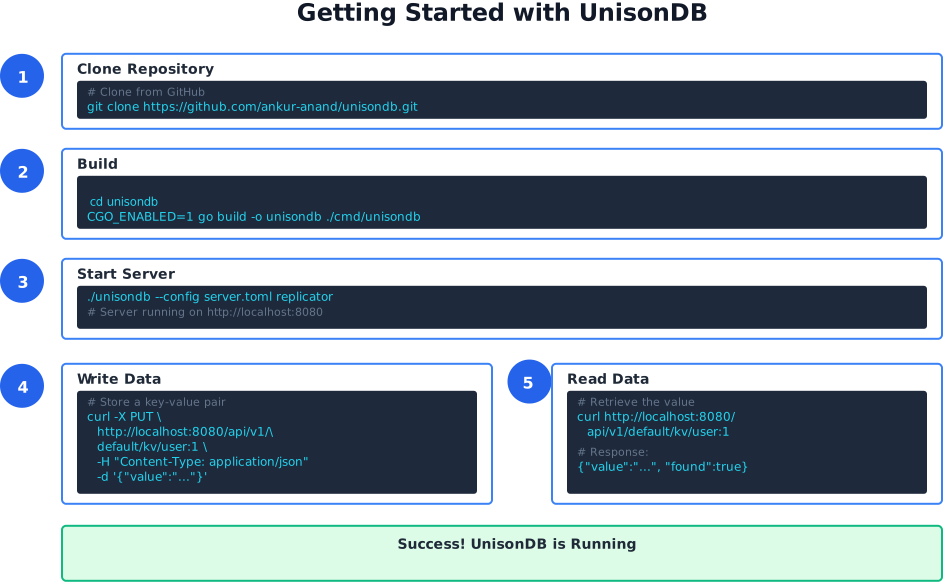
This guide will walk you through installing UnisonDB, configuring it, and running it in both Server and Replica modes.
          ┌────────────────┐
          │    Server      │
          │  (Primary)     │
          │  Writes → WAL  │
          │  Streams gRPC  │
          └──────┬─────────┘
                 │
        WAL Stream (gRPC)
                 │
   ┌─────────────┴──────────────┐
   ↓                            ↓
┌───────────┐              ┌───────────┐
│ Replica 1 │              │ Replica 2 │
│ (Reader)  │              │ (Reader)  │
│ Local DB  │              │ Local DB  │
│ Watch API │              │ Watch API │
└───────────┘              └───────────┘
Table of Contents#
Prerequisites#
System Requirements#
- Operating System: Linux or macOS
- Go: Version 1.24 or higher
Installation#
Building from Source#
UnisonDB requires CGO to be enabled for LMDB bindings.
# Clone the repository
git clone https://github.com/ankur-anand/unisondb.git
cd unisondb

# Enable CGO (required for LMDB)
export CGO_ENABLED=1

# Build the binary
go build -o unisondb ./cmd/unisondb

# Verify installation
./unisondb --help
Expected output:
  _   _          _                     ___    ___
 | | | |  _ _   (_)  ___  ___   _ _   |   \  | _ )
 | |_| | | ' \  | | (_-< / _ \ | ' \  | |) | | _ \
  \___/  |_||_| |_| /__/ \___/ |_||_| |___/  |___/

     Database + Message Bus. Built for Edge.
               https://unisondb.io

NAME:
   unisondb - Run UnisonDB

USAGE:
   unisondb [global options] command [command options]

COMMANDS:
   server      Run in server mode (primary, accepts writes)
   replica     Run in replica mode (read-only, streams from upstream)
   relay       Run in relay mode (replica with gRPC for downstream)
   fuzz        This is a testing-only feature (disabled in production builds)
   help, h     Shows a list of commands or help for one command

GLOBAL OPTIONS:
   --config value, -c value  Path to TOML config file (default: "./config.toml") [$UNISON_CONFIG]
   --env value, -e value     Environment: dev, staging, prod (default: "dev") [$UNISON_ENV]
   --help, -h                show help
Building with Fuzzer Support (Optional)#
For testing and development, you can build with fuzzer support:
CGO_ENABLED=1 go build -tags fuzz -o unisondb ./cmd/unisondbNote: When built with -tags fuzz:
fuzzcommand is availableservercommand is disabled for safety
To run fuzzer mode:
./unisondb fuzz --config config.tomlInstallation to System Path (Optional)#
# Move to system path
sudo mv unisondb /usr/local/bin/

# Verify
unisondb --help
Running in Server Mode#
Server Mode runs UnisonDB as a primary instance that accepts writes and serves reads.
1. Generate TLS Certificates (Recommended)#
For production or multi-node setups, generate TLS certificates for gRPC:
Using OpenSSL:
mkdir -p certs && cd certs

# Generate CA
openssl genrsa -out ca.key 4096
openssl req -new -x509 -key ca.key -sha256 -subj "/CN=UnisonDB CA" -days 365 -out ca.crt

# Generate server certificate
openssl genrsa -out server.key 4096
openssl req -new -key server.key -out server.csr -subj "/CN=localhost"
openssl x509 -req -in server.csr -CA ca.crt -CAkey ca.key -CAcreateserial -out server.crt -days 365 -sha256

# Generate client certificate
openssl genrsa -out client.key 4096
openssl req -new -key client.key -out client.csr -subj "/CN=client"
openssl x509 -req -in client.csr -CA ca.crt -CAkey ca.key -CAcreateserial -out client.crt -days 365 -sha256

cd ..
2. Create Server Configuration#
Create a server.toml configuration file:
## HTTP API port
http_port = 4000
listen_ip = "0.0.0.0"

## gRPC configuration (for replication)
[grpc_config]
listen_ip = "0.0.0.0"
port = 4001
cert_path = "./certs/server.crt"
key_path = "./certs/server.key"
ca_path = "./certs/ca.crt"
# For development only - allows insecure connections
allow_insecure = false

## Storage configuration
[storage_config]
base_dir = "./data/server"
namespaces = ["default", "users", "products"]
bytes_per_sync = "1MB"
segment_size = "16MB"
arena_size = "4MB"
wal_fsync_interval = "1s"

## WAL cleanup (prevents disk exhaustion)
[storage_config.wal_cleanup_config]
enabled = true
interval = "5m"
max_age = "1h"
min_segments = 5
max_segments = 100

## Write notification coalescing
[write_notify_config]
enabled = true
max_delay = "20ms"

## ZeroMQ notifications (optional - for local apps)
[notifier_config.default]
bind_port = 5555
high_water_mark = 1000
linger_time = 1000

[notifier_config.users]
bind_port = 5556
high_water_mark = 1000
linger_time = 1000

## Profiling endpoint
[pprof_config]
enabled = true
port = 6060

## Logging
[log_config]
log_level = "info"

[log_config.min_level_percents]
debug = 100.0
info  = 100.0
warn  = 100.0
error = 100.0
3. Start the Server#
Server Mode (using server command):
./unisondb server --config server.toml4. Verify Server is Running#
Check HTTP health endpoint:
curl http://localhost:4000/healthDevelopment Mode (Insecure)#
For quick local testing without TLS:
server-dev.toml:
http_port = 4000

[grpc_config]
port = 4001
allow_insecure = true  # WARNING: Development only!

[storage_config]
base_dir = "./data/server"
namespaces = ["default"]

[log_config]
log_level = "debug"
./unisondb server --config server-dev.tomlRunning in Replica Mode#
Replica Mode runs UnisonDB as a read-only replica that streams changes from an upstream server.
1. Create Replica Configuration#
Create a replica.toml configuration file:
## HTTP API port (different from server)
http_port = 5000
listen_ip = "0.0.0.0"

## gRPC config (can accept downstream replicas)
[grpc_config]
listen_ip = "0.0.0.0"
port = 5001
cert_path = "./certs/server.crt"
key_path = "./certs/server.key"
ca_path = "./certs/ca.crt"

## Storage configuration
[storage_config]
base_dir = "./data/replica"
namespaces = ["default", "users", "products"]
bytes_per_sync = "1MB"
# IMPORTANT: segment_size MUST match upstream server!
segment_size = "16MB"
arena_size = "4MB"

## Replica configuration - connects to upstream
[replica_config.primary]
namespaces = ["default", "users", "products"]
cert_path = "./certs/client.crt"
key_path = "./certs/client.key"
ca_path = "./certs/ca.crt"
upstream_address = "localhost:4001"
segment_lag_threshold = 100
allow_insecure = false

## Optional: Connect to multiple upstreams
# [replica_config.secondary]
# namespaces = ["products"]
# upstream_address = "other-server:4001"
# cert_path = "./certs/client.crt"
# key_path = "./certs/client.key"
# ca_path = "./certs/ca.crt"

## ZeroMQ notifications (optional)
[notifier_config.default]
bind_port = 6555
high_water_mark = 1000
linger_time = 1000

## Logging
[log_config]
log_level = "info"

[log_config.min_level_percents]
debug = 1.0   # Sample 1% of debug logs
info  = 10.0  # Sample 10% of info logs
warn  = 100.0
error = 100.0
2. Start the Replica#
Start replica:
./unisondb replica --config replica.toml3. Enable Relay Mode (Multi-Hop)#
To allow downstream replicas to connect, use relay mode instead:
./unisondb relay --config replica.tomlThis enables the node to act as both a consumer (from upstream) and a producer (to downstream).
Development Mode (Insecure)#
replica-dev.toml:
http_port = 5000

[grpc_config]
port = 5001

[storage_config]
base_dir = "./data/replica"
namespaces = ["default"]
segment_size = "16MB"  # Must match server!

[replica_config.primary]
namespaces = ["default"]
upstream_address = "localhost:4001"
allow_insecure = true  # WARNING: Development only!
segment_lag_threshold = 100

[log_config]
log_level = "debug"
./unisondb replica --config replica-dev.tomlBasic Operations#
Writing Data#
Key-Value Write (via HTTP):
# Put a key-value pair
curl -X POST http://localhost:4000/api/v1/namespaces/default/kv \
  -H "Content-Type: application/json" \
  -d '{
    "key": "user:123",
    "value": "eyJuYW1lIjoiQWxpY2UiLCJlbWFpbCI6ImFsaWNlQGV4YW1wbGUuY29tIn0="
  }'
Batch Write:
curl -X POST http://localhost:4000/api/v1/namespaces/default/kv/batch \
  -H "Content-Type: application/json" \
  -d '{
    "operations": [
      {"key": "user:1", "value": "..."},
      {"key": "user:2", "value": "..."},
      {"key": "user:3", "value": "..."}
    ]
  }'
Reading Data#
Read from Server:
curl http://localhost:4000/api/v1/namespaces/default/kv/user:123Read from Replica (same API):
curl http://localhost:5000/api/v1/namespaces/default/kv/user:123Subscribing to Changes (ZeroMQ)#
- Build UnisonDB with ZeroMQ Lib
This needs Zero MQ Installed Make Sure You’ve have it Installed. Install ZeroMQ dependency
# Clone the repository
git clone https://github.com/ankur-anand/unisondb.git
cd unisondb

# Build the binary (CGO required for RocksDB)
CGO_ENABLED=1 go build -tags zeromq ./cmd/unisondb
Python example (install pyzmq first):
import zmq

context = zmq.Context()
socket = context.socket(zmq.SUB)

# Subscribe to 'default' namespace
socket.connect("tcp://localhost:5555")
socket.setsockopt(zmq.SUBSCRIBE, b"")  # Subscribe to all messages

print("Listening for changes on namespace 'default'...")

while True:
    message = socket.recv()
    print(f"Change notification: {message}")
Run the subscriber:
python subscriber.pyNow any writes to the default namespace will trigger notifications!
Common Deployment Patterns#
1. Single Server (Development)#
# Terminal 1: Start server
./unisondb server --config server-dev.toml
2. Server + Single Replica (Read Scaling)#
# Terminal 1: Start server
./unisondb server --config server.toml

# Terminal 2: Start replica
./unisondb replica --config replica.toml
3. Server + Multiple Replicas (Edge Computing)#
# Terminal 1: Start server
./unisondb server --config server.toml

# Terminal 2: Start replica 1
./unisondb replica --config replica1.toml

# Terminal 3: Start replica 2
./unisondb replica --config replica2.toml

# Terminal 4: Start replica 3
./unisondb replica --config replica3.toml
4. Multi-Hop (Relay → Replica)#
# Terminal 1: Primary server
./unisondb server --config server.toml

# Terminal 2: L1 relay (with gRPC for downstream)
./unisondb relay --config relay-l1.toml

# Terminal 3: L2 replica (connects to L1)
# Update replica-l2.toml upstream_address to point to L1 (localhost:5001)
./unisondb replica --config replica-l2.toml
Happy building with UnisonDB!